Black Woman Journal Self Publishing Kit: A Complete Template Solution for Busy Creatives
Self-publishing a journal can feel like a monumental task, especially when you are balancing work, family, and creative ambitions. The Black Woman Journal Self Publishing Kit is designed to remove the guesswork from the publishing process, offering a pre-built structure that lets you focus on your unique voice and design. Rather than wrestling with margins, trim sizes, and interior formatting, you receive a ready-to-customize package that works with platforms like KDP and Lulu. This article walks through what this kit includes, how it fits into your publishing workflow, and practical strategies for making the most of every template.
What the Black Woman Journal Self Publishing Kit Actually Delivers
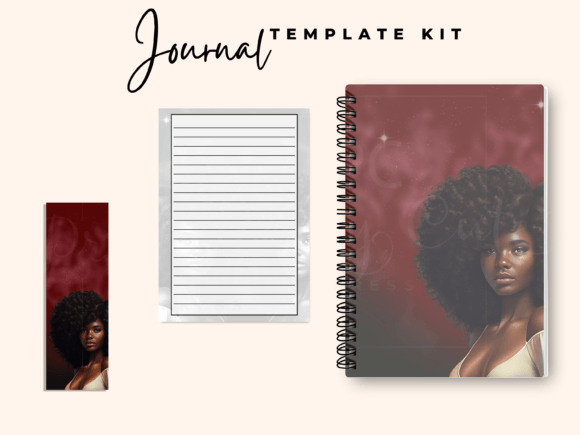
At its core, this kit is a done-for-you template pack that includes a 6x9 inch journal cover, 100 lined interior pages, and a printable bookmark template. All assets are editable in Canva, which means you do not need specialized design software or advanced technical skills. After purchase, you receive a PDF containing links to your templates. You download them, open Canva, and begin customizing with your title, fonts, graphics, and logo.
Importantly, the cover images themselves are not editable—but you can layer your own text, logos, and additional graphic elements on top. This gives you creative freedom while preserving a professionally designed foundation. The interior pages are lined and ready for print, so you do not have to spend hours setting up margins or pagination. The bookmark template adds a thoughtful physical touch that many readers appreciate.
This kit is especially useful if you are a busy mom, creative entrepreneur, or solopreneur who wants to publish a journal without hiring a designer or learning InDesign. It removes the most time-consuming parts of the layout process so you can move directly to branding and content decisions.
Where This Kit Fits in Your Self-Publishing Workflow
Every self-publishing project follows a general arc: planning, content creation, design, formatting, review, and publication. The Black Woman Journal Self Publishing Kit covers the design and formatting stages almost entirely. Here is how it maps to each phase of a typical project.
Planning Phase
Before you touch the templates, decide on your journal’s purpose, target audience, and tone. Will it be a guided gratitude journal, a daily planner, a wellness log, or a blank lined notebook for free writing? Knowing this helps you choose the right cover imagery and font pairings. The kit itself is genre-agnostic, so it works for any theme as long as you adapt the cover graphics and interior styling accordingly.
Content Preparation
Your content—whether prompts, quotes, or simply lined pages—should be finalized before you start customizing. The kit provides 100 lined interior pages, which is a common length for paperback journals. If you want to add extra pages or include prompts, you can duplicate the lined template within Canva and insert your text. This is a good moment to proofread everything thoroughly, because editing inside a template after you have added decorative elements can be cumbersome.
Design and Customization
This is where the kit does the heavy lifting. Open the cover template in Canva and upload your own background image, logo, and title text. The 6x9 inch format is a standard trade paperback size, so it fits comfortably in bags and on shelves. The lined interior pages need very little work—just a header or footer if you want one. The bookmark template can be printed on cardstock, cut out, and included as a bonus insert. Because all templates are in Canva, you can also adjust colors, fonts, and spacing without worrying about breaking the layout.
Formatting for Print Platforms
Once your designs are complete, export them as PDFs with print-ready settings (CMYK color mode, 300 DPI, and bleed if required). The kit is built with KDP and Lulu in mind, but the same files can be uploaded to any print-on-demand service that accepts standard PDF uploads. Double-check the trim size and margins against your chosen platform’s specifications—most accept 6x9 with a 0.125 inch bleed. The templates already account for this, but a quick review saves you from costly reprints.
Review and Quality Control
Before publishing, order a physical proof. The templates are professionally designed, but colors on screen can differ from print. Check that your text is not too close to the edges, that the bookmark fits within a standard page size, and that the interior lines appear crisp. This step also lets you test the paper quality and binding style offered by your printer. If you are using KDP, you can approve a digital proof first, but a physical proof is always recommended for journals meant to be written in.
Publication and Distribution
After review, upload your final PDFs to your chosen platform, fill in metadata (title, author, description, keywords), and set your pricing. The Black Woman Journal Self Publishing Kit does not include marketing templates, but your Canva skills can extend to social media graphics using the same color palette and fonts. Consider creating a simple promotional image that mirrors your cover design to maintain brand consistency across channels.
Practical Implementation Tips for Real Workflows
Getting the most out of this kit requires a bit of preparation and some understanding of Canva’s interface. Here are several observations and strategies that will help you move from purchase to publication more smoothly.
Prepare Your Assets Before You Start Customizing
Gather your logo, any background images, your chosen fonts (either from Canva’s library or uploaded), and your color palette before opening the template. This prevents context switching and keeps your design session focused. If you are using a photograph or illustration for the cover, make sure it is high resolution (ideally 300 DPI at 6x9 inches) and that you have the rights to use it commercially.
Work in Layers for the Cover
Since the cover images are not editable, treat them as a base layer. Add text, shapes, and logos on top, but keep a backup of the original template in case you want to start over. Use Canva’s transparency tools to blend your elements with the background image. If the provided cover style does not match your vision, you can completely replace the background with your own image—the template still provides the correct dimensions, bleed guides, and spine width calculations.
Customize the Interior Thoughtfully
The 100 lined pages are uniform, which is perfect for a classic writing journal. However, if you want to create a guided journal, insert prompt pages every five or ten spreads. You can do this by duplicating the lined page template in Canva and adding a text box with your prompt. Keep the line spacing consistent so the overall look remains cohesive. If you add too many elements, test the file size—Canva PDFs can become large, and some print platforms have upload limits.
Leverage the Bookmark as a Marketing Tool
The printable bookmark template is a small but powerful asset. Print it on quality cardstock and include it as a freebie in every order. Add your website, social media handle, or a QR code linking to your author page. Readers often keep bookmarks, which means your brand stays visible long after they finish using the journal. If you sell at in-person markets or events, bookmarks also work as handouts that drive traffic to your online store.
Plan for Multiple Editions
Once you have customized one journal, you can create variations by swapping the cover image and adjusting the title. The interior remains reusable. This is efficient if you want to publish a series—for example, a Black Woman Journal with different themes for reflection, goal-setting, and gratitude. Each version only requires a new cover design, saving you hours of interior work.
How the Kit Interacts with Other Tools and Platforms
The Black Woman Journal Self Publishing Kit is built around Canva, but its utility extends beyond that single application. Understanding how it fits alongside other tools will help you build a streamlined publishing system.
Canva as the Primary Editor
Canva is free to use, and the kit assumes you have a working knowledge of how to navigate the interface—adding text, uploading images, adjusting colors, and exporting PDFs. If you are new to Canva, the learning curve is shallow. The templates are organized with clear layers and locked elements where needed, so you cannot accidentally break the layout. You can also collaborate with a designer or co-author by sharing the Canva link, which makes team projects manageable.
Print-on-Demand Platforms
KDP and Lulu are the most common destinations for these files. Both accept 6x9 inch PDFs with bleed, and both provide free ISBNs if you choose their standard options. The kit does not include an ISBN or barcode, but you can generate a barcode through your chosen platform or purchase one separately if you want to retain publishing rights across multiple retailers. If you plan to sell on Etsy or Gumroad as a digital download, you can skip the print setup entirely and offer the PDF version directly to customers.
Asset Management and Backup
Keep your final PDFs and Canva project files organized in a dedicated folder. If you ever need to update a journal—fix a typo, change a price, refresh the cover—you can return to the original template and export a new version. This is much easier than starting from scratch. Version control matters, especially if you publish across multiple platforms and need to maintain consistent files.
Printing and Quality Considerations
If you are ordering author copies for personal use or local sales, test print on your home printer first to check alignment. For professional distribution, always use a print-on-demand service or a short-run printer that understands book specifications. Paper weight, coating, and binding type affect the final feel of the journal. The kit assumes a standard paperback interior, but you can adapt the cover to a glossy or matte finish depending on your printer’s options.
Long-Term Use and Scalability
One of the strongest arguments for using a template kit is reusability. After your first journal is live, you have a repeatable process for future projects. The Black Woman Journal Self Publishing Kit is not a one-time asset—it is a foundation you can build on.
Consider maintaining a master Canva file that contains all the elements you use regularly: your logo, brand colors, standard fonts, and any decorative graphics. When you start a new journal, you can pull from this master and drop it into the template. Over time, your branding becomes consistent across your entire catalog, which builds recognition and trust with your audience.
If you decide to expand into planners, notebooks, or workbooks, you can apply the same template strategy. Many of the design principles—trim size, bleed, line spacing, cover layout—transfer directly. The kit gives you a concrete starting point so you can focus on content and marketing instead of reinventing the production process each time.
Final Practical Observations
The Black Woman Journal Self Publishing Kit is most effective when you approach it as a shortcut, not a crutch. It handles the technical formatting so you can invest your energy in the creative decisions that matter: what your journal says, how it looks, and who it serves.
If you are a busy mom or creative, time is your scarcest resource. Using a pre-built template eliminates at least a week of layout work, assuming you would have done it manually. That time can be redirected toward writing content, building an audience, or simply resting. The kit also reduces the risk of formatting errors that could cause a print rejection or a poor customer experience.
Before purchasing, confirm that you have a reliable internet connection (Canva is cloud-based) and a Canva account (free is sufficient). The PDF link delivery means you can access your templates immediately, but download and back them up in case the link expires. If you plan to heavily modify the cover, make sure you are comfortable with Canva’s layering and transparency features. Otherwise, the kit works as advertised with minimal setup.
Ultimately, this kit is a practical tool for turning a journal idea into a physical product without unnecessary friction. Whether you are publishing your first journal or adding to an existing lineup, the combination of cover, interior, and bookmark templates gives you a cohesive package that is ready for the marketplace. The rest is up to your creativity.